Summarize with ChatGPTClaudePerplexity
TL;DR
- Google explicitly documents AI Mode fan-out as multiple related searches run concurrently across subtopics and data sources, while AI Overviews may use the same technique.[1][2]
- ChatGPT typically rewrites prompts into one or more targeted provider queries, and its Responses API usually—but not always—returns those query strings.[4]
- Perplexity uses adaptive multi-step search, with query visibility varying between Pro Search streaming and the Agent API.[19][9]
- Copilot Chat can expose the exact Bing query for a limited 24-hour period, while Gemini’s grounding APIs expose structured query metadata such as `webSearchQueries`.[15][3]
- Fan-out capture tools should separate query strings, tool calls, retrieved URLs and citations, and should record unavailable query data as unknown rather than zero.[3]
What is query fan-out?
Query fan-out is the process of expanding one user prompt into multiple related searches, often across subtopics, sources or search providers, before an AI-generated answer is produced. Google explicitly uses the term for AI Mode and says AI Overviews may also use the technique.[1][2]
The key distinction is between query expansion and query visibility. An engine may document that it creates multiple searches without exposing the resulting query strings to users or third-party tools. Conversely, an API may expose query metadata without proving that the same trace represents the consumer product.
Fan-out can include several different actions:
- Rewriting the original prompt into more targeted searches.
- Splitting a complex question into subtopics.
- Running searches concurrently.
- Issuing follow-up searches after reviewing results.
- Opening pages or searching within pages.
- Combining retrieved evidence into a cited answer.
These actions should not be counted as the same metric. A query string, search-tool call, retrieved URL and final citation each describe a different stage of retrieval.[3]
How do the major engines compare?
The table below separates each vendor’s documented behavior from what a user or capture tool can actually inspect.
| Engine | Officially documented behaviour | Is the sub-query visible to users? | Source |
|---|---|---|---|
| Google AI Mode | Runs multiple related searches concurrently across subtopics and data sources; Google calls this query fan-out.[1] | A complete consumer query export is not documented. Users generally see the answer and supporting links.[2] | Google Search Central and Google Search announcements[2] |
| Google AI Overviews | May use query fan-out across subtopics and data sources.[2][1] | A complete consumer query export is not documented.[4] | Google Search Central[2] |
| ChatGPT Search | Typically rewrites a prompt into one or more targeted provider queries and may refine searches after reviewing results.[5] | Consumer users may see citations and sources, but not necessarily every rewritten query. The Responses API usually, but not always, returns query strings.[4] | OpenAI Help Center and API documentation[5][6] |
| Perplexity | Pro Search plans and performs multi-step research, combining searches, page retrieval and follow-up searches.[7][8] | Pro Search can show research steps, while documented streaming and Agent API surfaces can expose search terms or query arrays.[9] | Perplexity documentation |
| Microsoft Copilot | Parses a prompt, identifies relevant terms and generates Bing queries when web search is used.[10][11] | Copilot Chat can show the exact Bing query for a limited period; Foundry exposes query references but not raw grounded search content.[12][13] | Microsoft documentation[14][10] |
| Gemini | Google’s grounding API can automatically generate one or multiple searches, then return query metadata and sources.[8][15] | The Gemini API exposes webSearchQueries; consumer Gemini generally exposes sources and related links rather than a guaranteed query log.[15][8] |
Google Gemini documentation[15] |
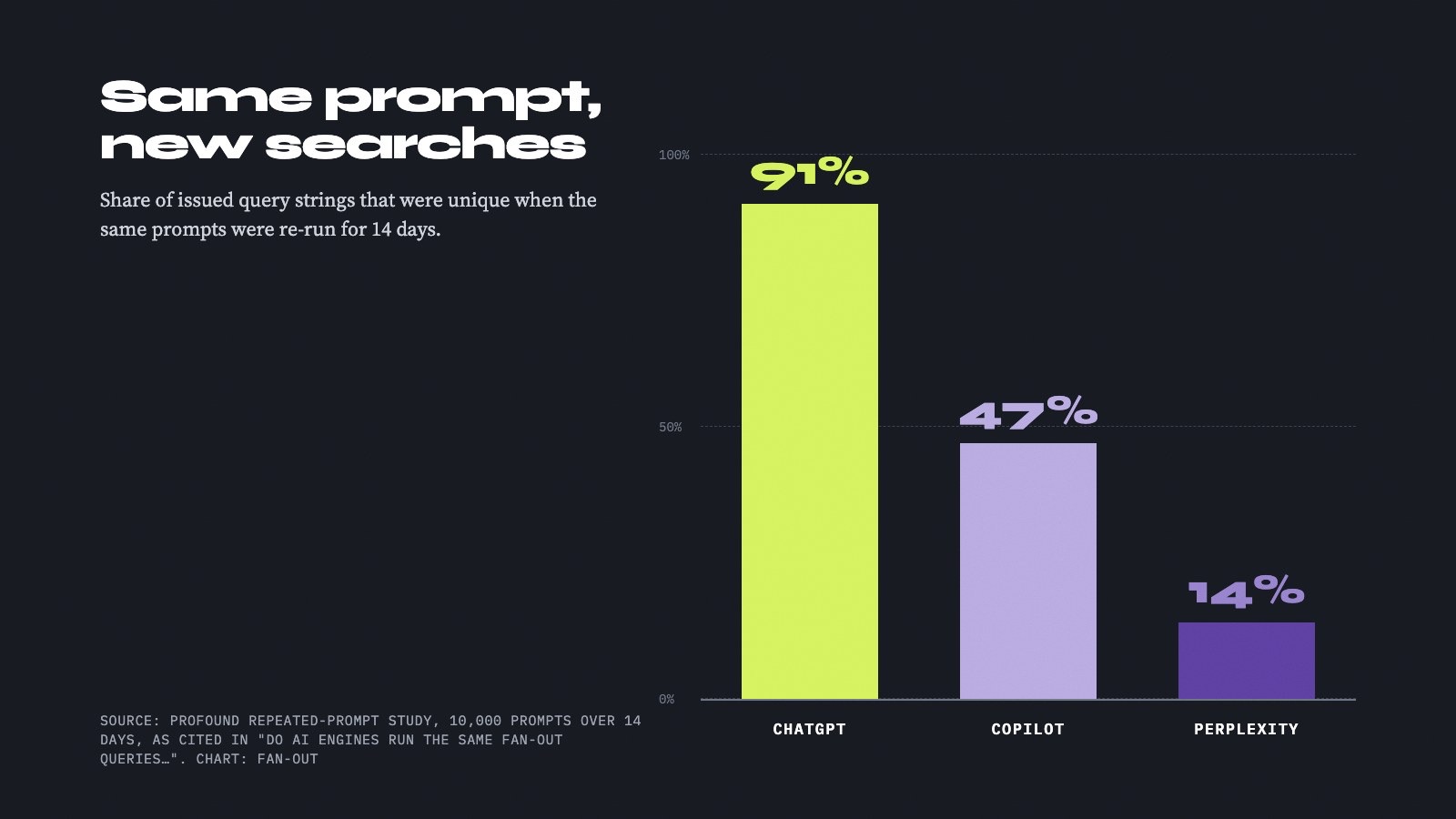
No universal ranking of “which engine fans out most” is defensible from the available evidence. Observed counts vary according to the product surface, sample, date and whether only responses with recorded searches were included.[3]
How does Google AI Mode expand a query?
Google provides the clearest public description of fan-out. It says AI Mode breaks a question into subtopics and issues multiple related queries concurrently across multiple data sources.[1] Google Search Central says both AI Mode and AI Overviews may use query fan-out, and that the two products may use different models and techniques.[2] Finseo’s own study found that AI Mode and AI Overviews share only 13.7% of cited URLs on the same query.
That qualification matters. A complex comparison may trigger several subtopic searches, but Google does not publish a fixed number of searches per answer, a universal maximum or a guarantee that every AI Overview uses fan-out.[3][16]
Google’s examples also distinguish between ordinary AI Mode fan-out and deeper research features. A shopping example describes AI Mode examining hundreds of ticket options, but that is a count of potential options, not a published count of generated search queries.[17] Similarly, claims about “hundreds of searches” for Deep Search should not be treated as the default behavior of every AI Mode response.[17]
What can users and tools see?
Users can see the generated response and supporting links. Google’s public documentation does not establish a complete consumer-facing export of the underlying subqueries.[4]
For visibility work, this means Google AI Mode can reveal evidence about the outcome of fan-out—such as the sites linked and topics represented—but not necessarily the exact intermediate query set. A tool that reports Google fan-out should therefore distinguish observed links from inferred subqueries.
AI Mode’s mechanism is best summarized as:
- Explicitly documented parallel expansion.
- Subtopics and multiple data sources.
- No published default query count.
- Supporting links visible.
- Complete consumer query transcript not documented.
How does ChatGPT search expand a query?
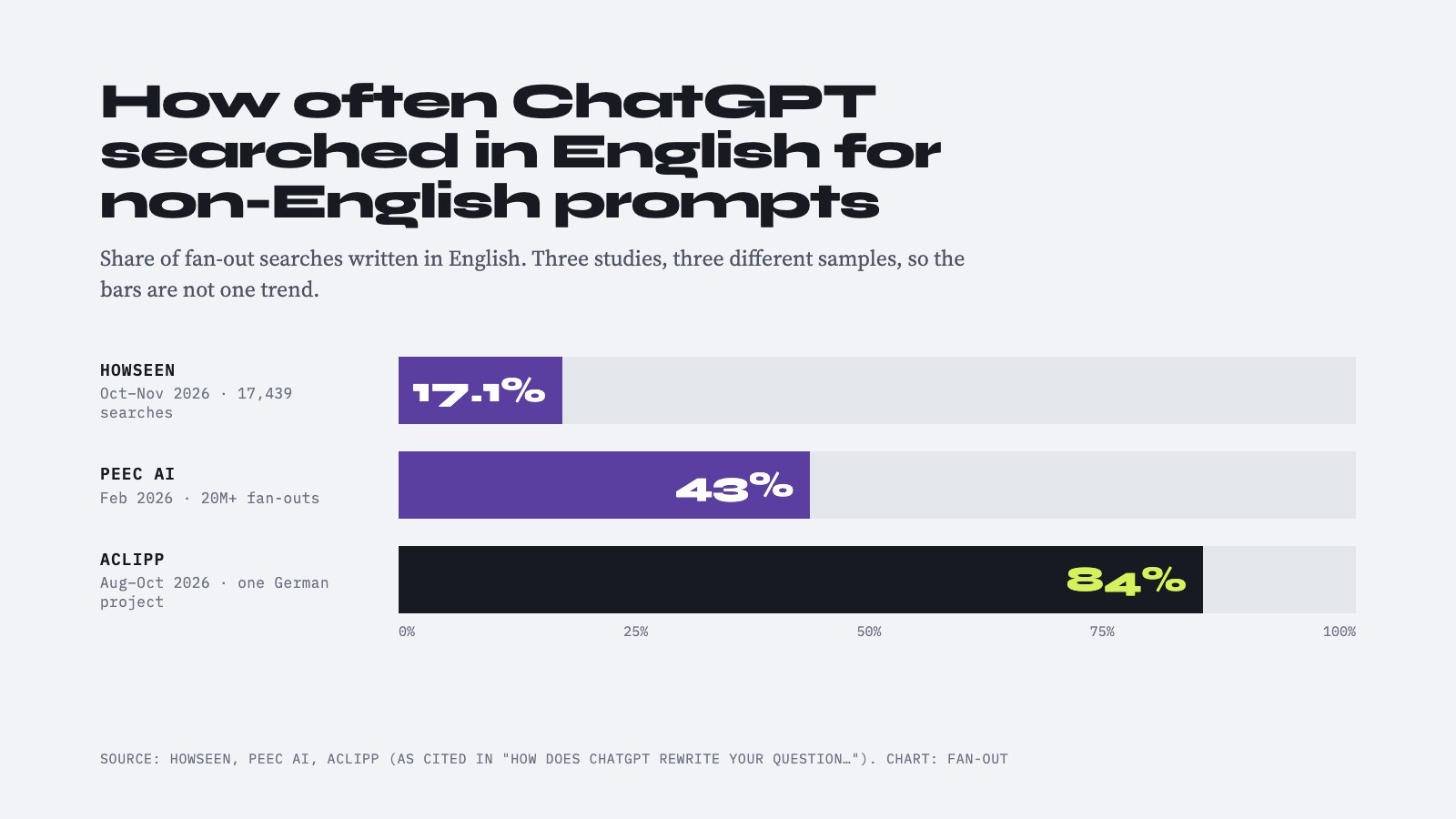
OpenAI says ChatGPT Search typically rewrites a user’s prompt into one or more targeted queries sent to search providers.[5] The rewritten searches do not need to reproduce the original wording.
OpenAI’s example describes a research question about drugs targeting CCR8 for cancer. ChatGPT might first search for current CCR8 immunotherapy development and then issue a more specific follow-up search after reviewing the results.[5] This supports a model of query rewriting followed by iterative refinement, rather than a guaranteed fixed batch of parallel searches.
OpenAI does not state that every ChatGPT Search request uses the same number of queries or the same sequence. The consumer product’s visible citations and source controls also should not be treated as a complete retrieval trace.[18][4]
What does the Responses API expose?
OpenAI’s Responses API documents several separate artifacts:
- A
web_search_callindicates that a web-search operation occurred.[3] - The search action may include generated
queries.[19][4] - OpenAI says those queries are usually, but not always, returned.[4]
open_pageandfind_in_pagerepresent different browsing actions.[4]- URL-citation annotations identify sources cited in the final answer.[20][4]
- An optional sources field can return consulted sources beyond the smaller set of final citations.[4]
This distinction is essential for measurement. Counting citations does not reveal the number of searches, and counting search-tool calls does not necessarily reveal the number of query strings.
A capture system should preserve a missing queries field as unknown, not as zero. OpenAI’s “usually, but not always” qualification means absent query data does not prove that no rewritten query was used.[4]
How does Perplexity expand a query?
Perplexity describes Pro Search as a multi-step process that plans, searches, analyzes results and performs follow-up searches when needed.[7][21] Its documentation presents research as an adaptive sequence rather than a fixed number of simultaneous queries.
A documented tool example alternates between searching and reading. The system may search for incentives and costs, retrieve policy documents, then search again to verify electricity rates or compare providers.[19] A visible research step can therefore represent either a new search, page retrieval or another tool action.
Which Perplexity surfaces expose query data?
Perplexity’s surfaces have different response contracts:
- Consumer Pro Search can display a step-by-step research approach, but that does not guarantee a complete raw query transcript.[9]
- Documented Sonar Pro streaming records can include tool executions,
search_keywordsand search results.[19] - The Agent API can return search-result output items containing
queriesandresults.[22][4] - Legacy completion fields such as
search_resultsandnum_search_queriesshould not be treated as interchangeable with query strings.[4]
Perplexity’s migration documentation directs new projects toward the Agent API, whose typed output separates messages, tool calls and search results.[23] A collector built around a legacy citations array may therefore lose query-level information.
The practical description is:
- Adaptive, multi-step search.
- Searches may follow page retrieval.
- Query visibility depends on API and response mode.
- No fixed universal Pro Search query count.
- Consumer research steps are not guaranteed to equal a complete raw query log.
How does Copilot expand a query?
Microsoft documents that Copilot can parse a prompt, identify relevant terms and generate a Bing query when web search is needed.[10][11] The generated query may contain only a few prompt-derived words rather than the full original question.[3][10]
This establishes prompt-derived Bing grounding, but not a universal parallel-search strategy. Microsoft’s documentation covers specific Copilot experiences, so behavior should not automatically be generalized across every product carrying the Copilot name.[16][10]
Can users see Copilot search queries?
In Copilot Chat, Microsoft Support says that when web search is used, a Sources control can show the exact query sent to Bing and the sources used.[24] Microsoft’s administrative documentation adds two important constraints:
- Query visibility is documented for Copilot Chat, not every Microsoft 365 Copilot pane.[10][11]
- Queries remain available in the chat thread for 24 hours.[10][11]
This makes Copilot unusually useful for short-window manual capture. A monitoring workflow must collect the query promptly rather than assuming that the interface provides permanent access.
Microsoft Foundry’s Bing grounding documentation describes a different developer surface. The model-generated Bing query and website citations can be visible, but developers and end users do not receive the raw content returned by Bing grounding.[12] Foundry classic stores Bing query URLs in run-step details, while website URLs appear in response annotations.[13]
Copilot therefore offers:
- Exact query visibility in a specific consumer chat surface.
- Developer-visible query references in Bing grounding.
- No single query-export contract across all Copilot products.
- No raw grounded search-result payload in the documented Foundry flow.[12][13]
How does Gemini expand a query?
Google’s Gemini grounding documentation says that, when Google Search grounding is enabled, the model decides whether search would improve the answer. If so, it automatically generates one or multiple search queries, executes them, processes the results and returns a grounded response.[20][8]
The documented generateContent response can include:
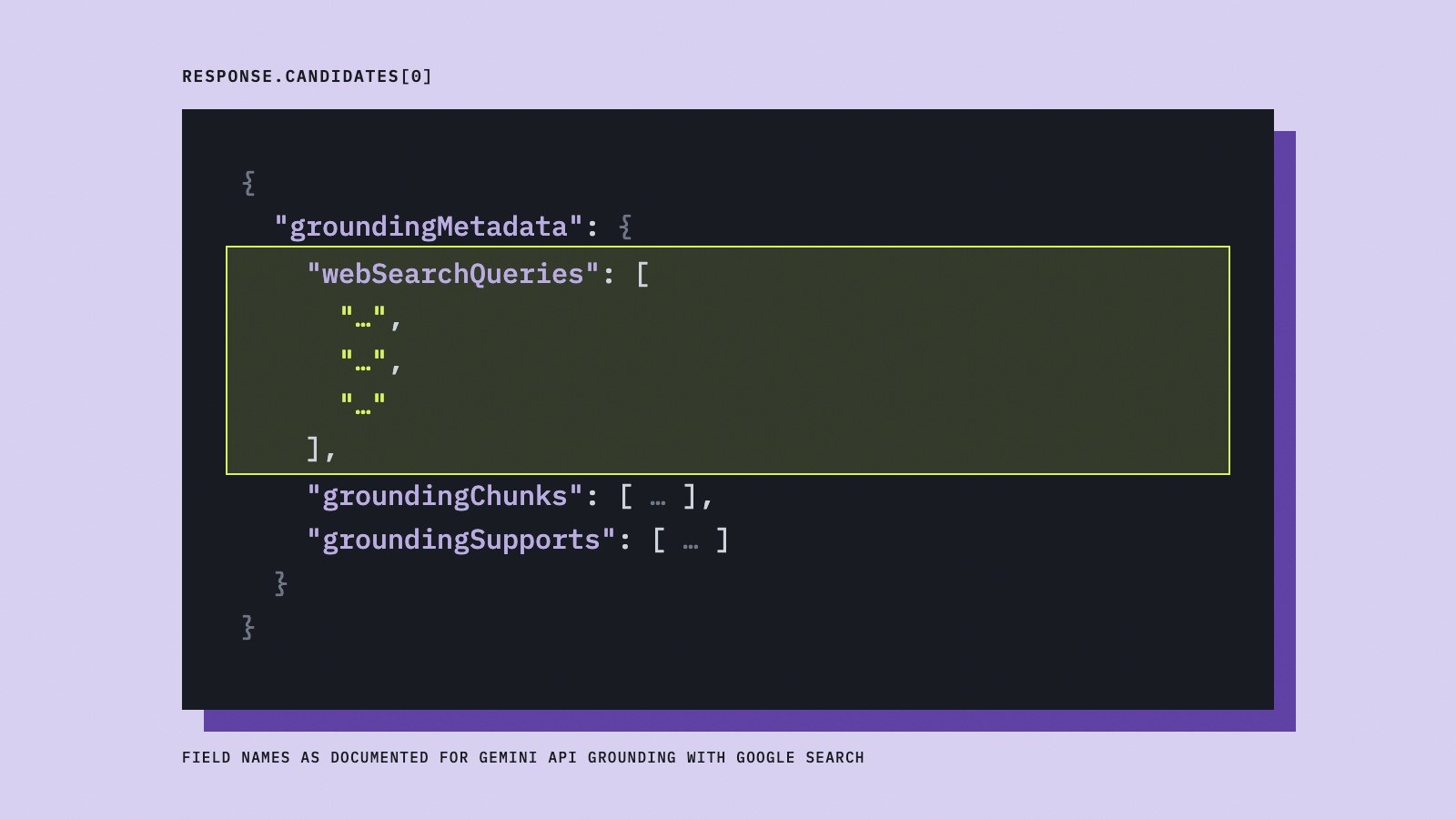
groundingMetadata.webSearchQueries: the generated search-query strings.groundingChunks: web sources such as URLs and titles.[18][15]groundingSupports: links between answer text and source chunks.[15]searchEntryPoint: required search-suggestion presentation data.[15][8]
Google’s example includes two differently phrased searches for the same subject. Those strings demonstrate the metadata format, not a guarantee that every Gemini request produces two queries.[9][4]
The Interactions API provides another format, with Google search calls containing query arguments and separate search-result steps.[20] A capture tool should identify the endpoint and response format before parsing fields.
Are Gemini consumer sources the same as grounding queries?
No. Gemini’s consumer interface can show sources and related content, but Google warns that links produced by its double-check feature are not necessarily the sources Gemini used to generate the original response.[25] Double-check links should therefore not be treated as an original fan-out transcript.
Gemini’s strongest documented query-level capture surface is the developer API. Consumer source cards can help assess answer evidence, but they do not establish the exact set of grounding queries.
What can fan-out capture tools observe?
A capture tool should report observed artifacts separately from undocumented or inferred behavior.
- Google AI Mode and AI Overviews: It can record the original prompt, answer, supporting links and visible topic coverage; it generally cannot claim a complete consumer subquery export from the cited documentation.[2]
- ChatGPT Search: It can capture visible citations and, where available, Responses API search actions and query strings; absent
queriesfields must remain unknown.[3] - Perplexity: It can capture documented streaming search terms or Agent API
queries, provided the collector records the exact API and response mode.[9][3] - Copilot Chat: It can capture the exact Bing query when the Sources workflow exposes it, but the documented chat visibility window is 24 hours.[10][11]
- Microsoft Foundry Bing grounding: It can capture query references and citations, but not the raw content returned by Bing grounding.[12]
- Gemini generateContent: It can capture
groundingMetadata.webSearchQueries, sources and text-to-source relationships.[15][8] - Gemini consumer apps: It can record visible sources and related links, but not assume those links are a complete original query log.[25]
- All engines: It should separate query strings, tool calls, opened pages, retrieved URLs and final citations.[4]
- All engines: It should store the product, endpoint, model where exposed, date, region, interface and streaming mode.
- All engines: It should preserve raw events and label unavailable data “not exposed” or “not published,” never silently convert it to zero.
Observed studies reinforce the need for denominators. Bee LLM reported an average of 4.79 auxiliary queries for ChatGPT and 2.67 for Gemini among responses with recorded searches, while another ChatGPT study reported a mean of 1.48 under a different sample and collection method.[16] An academic trace study reported different means for available-query turns across ChatGPT, Claude, Grok and DeepSeek.[3]
These figures are observations, not permanent vendor specifications. A tool comparing engines should publish sample size, inclusion rules, date range and whether the denominator includes responses with no recorded searches.[18]
How do grounding APIs expose search queries?
Grounding APIs provide some of the clearest documented query-level evidence, but each vendor exposes it differently.
Gemini’s generateContent grounding metadata includes webSearchQueries, along with source chunks and mappings between answer text and sources.[15] Gemini’s Interactions API uses Google search-call arguments containing query arrays and separate result steps.[20]
Microsoft Foundry’s Bing grounding documentation says the model-generated Bing query is visible to developers, while the raw content returned by Bing is not provided to developers or end users.[12] Foundry classic places Bing query URLs in run-step details and website citations in response annotations.[13]
These fields should be treated as product-specific telemetry, not as a universal fan-out schema. Query strings, search results and answer citations remain separate objects.
What does fan-out mean for AI visibility?
Fan-out changes what it means to optimize for an AI answer. A page may need to address not only the user’s wording, but also the related subtopics an engine is likely to search.
The strongest practical approach is to:
- Map the main prompt to likely subtopics.
- Answer related questions clearly within the same content cluster.
- Provide crawlable, well-structured pages that support specific claims.
- Track citations and linked pages separately from query visibility.
- Compare engines using the same prompt set and observation window.
- Preserve raw query data when an API exposes it.
- Avoid treating a vendor’s visible source list as a complete fan-out trace.
Google’s documentation suggests that AI Mode and AI Overviews can surface a wider and more diverse set of supporting links through related searches.[2] ChatGPT, Perplexity, Copilot and Gemini expose different combinations of rewritten queries, search actions, sources and citations.[3]
The central measurement question is therefore twofold:
- How does the engine expand the prompt?
- Which parts of that expansion can the selected interface reveal?
A credible fan-out report answers both questions and states what remains unknown.
Frequently asked questions
Which AI search engines use query fan-out?
Google explicitly documents query fan-out for AI Mode and says AI Overviews may use it.[2][1] ChatGPT, Perplexity, Copilot and Gemini document related forms of query rewriting, multi-step search or grounded search, but they use different terminology and expose different evidence.[3]
How does query fan-out differ between ChatGPT and Google AI Mode?
Google describes concurrent searches across subtopics and data sources, while OpenAI describes rewriting a prompt into one or more targeted provider queries and potentially refining the search after reviewing results.[5] Google does not document a complete consumer query export, whereas the OpenAI Responses API can usually return query strings, though not always.[4]
Can I see Google AI Mode’s fan-out queries?
Google’s public documentation describes the fan-out mechanism and supporting links but does not establish a complete consumer-facing export of every generated query.[2] A tool can observe the answer and linked sources, but should label exact subqueries as unavailable unless it has separate, documented telemetry.
Does Perplexity expose its fan-out queries?
Sometimes. Perplexity’s documented Pro Search streaming tools can expose `search_keywords`, and Agent API search-result items can include `queries`.[19][9] Visibility depends on the API, endpoint and response mode, so a final citation list should not automatically be treated as a complete query transcript.
Can Copilot show the Bing queries it sends?
Copilot Chat can show the exact Bing query through its Sources workflow when web search is used.[24][10] Microsoft documents that these queries remain available in the chat thread for 24 hours, and other Copilot surfaces may expose different information.[10][11]
Does Gemini show grounding queries?
The Gemini `generateContent` API documents `groundingMetadata.webSearchQueries`, and the Interactions API exposes query arguments for Google search calls.[20] Consumer Gemini sources and double-check links are not equivalent to a guaranteed original grounding-query log.[25]
Sources
- 1Expanding AI Overviews and introducing AI Mode — blog.google
- 2AI Features and Your Website | Google Search Central | Documentation | Google for Developers — developers.google.com
- 3Characterizing Web Search by Conversational LLM Agents:From Search Decisions and Strategies to Results and Responses — arxiv.org
- 4Web search — developers.openai.com
- 5Searching the web with ChatGPT | OpenAI Help Center — help.openai.com
- 6ChatGPT search for Enterprise and Edu | OpenAI Help Center — help.openai.com
- 7Pro Search: Upgraded for more advanced problem-solving — perplexity.ai
- 8Grounding with Google Search - generateContent API | Google AI for Developers — ai.google.dev
- 9Sonar API - Perplexity — docs.perplexity.ai
- 10Data, privacy, and security for web search in Microsoft Copilot and Microsoft Copilot Chat | Microsoft Learn — learn.microsoft.com
- 11Data, privacy, and security for web search in Microsoft 365 Copilot and Microsoft 365 Copilot Chat | Microsoft Learn — learn.microsoft.com
- 12Use Grounding with Bing Search tools with the agents API - Microsoft Foundry | Microsoft Learn — learn.microsoft.com
- 13How to use Grounding with Bing Search in Foundry Agent Service (classic) - Microsoft Foundry (classic) portal | Microsoft Learn — learn.microsoft.com
- 14Search public data or use a Bing Custom Search for generative answers nodes - Microsoft Copilot Studio | Microsoft Learn — learn.microsoft.com
- 15Grounding with Google Search | Gemini Enterprise Agent Platform | Google Cloud Documentation — docs.cloud.google.com
- 16Query Fan-Out in ChatGPT and Gemini Across 6,352 Searches | Bee LLM — beellm.ai
- 17AI Mode in Google Search: Updates from Google I/O 2025 — blog.google
- 18Changelog — docs.perplexity.ai
- 19Built-in Tool Capabilities - Perplexity — docs.perplexity.ai
- 20Grounding with Google Search | Gemini API | Google AI for Developers — ai.google.dev
- 21What is Pro Search? | Perplexity Help Center — perplexity.ai
- 22Create Chat Completion — docs.perplexity.ai
- 23Migrate from Sonar to the Agent API - Perplexity — docs.perplexity.ai
- 24How web search works in Microsoft Copilot Chat and agents | Microsoft Support — support.microsoft.com
- 25View related sources and double-check responses from Gemini Apps - Computer - Gemini Apps Help — support.google.com